
How Municiply works:
a little less routine, a lot more room for your community.
Municiply turns your calendars and announcements into social content ready for your approval, and helps residents find answers in the information your village already publishes. Your team stays in control of all of it.
Photography: Land O’Lakes, Inc. / Unsplash · Photography & sources
The event is already
on your calendar.
Municiply reads your upcoming events and community information and prepares social content for your team to review. Step through it below.
- The detailsDate, time, location and description, taken from the calendar entry your staff created.
- Your photographsImages your staff uploaded to the media library, including resident submissions your team has reviewed.
- Your voiceThe way your village writes, drawn from the posts you have already approved.
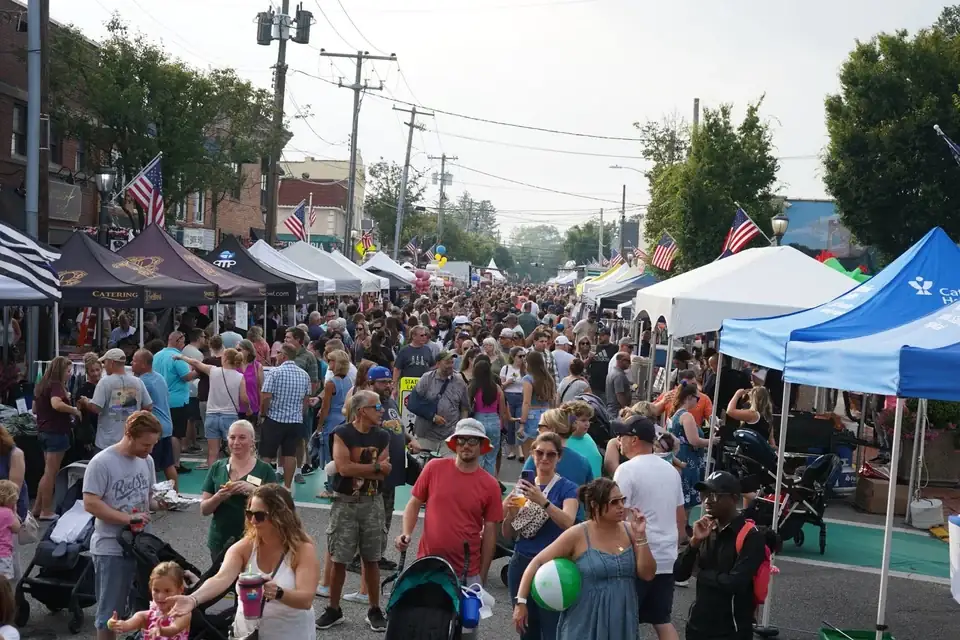
main-street-fair.jpgSelected from your media library
- Check the factsThe date, the time and the location against the event your office published.
- Edit anythingReword the message, swap the photograph, change which channels it goes to.
- Approve, or send it backOnly a person on your staff can approve. The approval is recorded with the name and the time.
Community Connect covers your social channels as they become available, at no change to the price. Today that means Facebook. Instagram is in development; Google Business Profile and Nextdoor are planned. See the full availability table before you sign anything.
A little local shopping. A familiar face. Join your neighbors at our community street fair and celebrate the businesses that make this place our own.
The same approved update is prepared for each connected channel.
Illustrative workflow using a real community street fair photograph. The event, the draft and the published example are design previews on this page — no account is connected here, and no post is created, scheduled or published from this page.
Help them find the answer.
Give your staff some breathing room.
The Virtual Agent helps residents navigate the information your village provides — service schedules, forms, hours and department contacts. Pick a question to see the shape of an answer.
Example conversation. The Agent assists residents; your staff remain the authority, and an unpublished answer becomes a referral rather than a guess.
Your staff manage the Knowledge Sources.
- Choose the subjects the Agent may answer, and keep the rest with your staff.
- Answers are drawn from village-approved sources, and the sources are shown alongside them.
- When something is not published, the Agent says so and points at the right office.
- Pause the Agent at any time from the same workspace.
The Virtual Agent helps with routine resident questions. It does not make official decisions, it does not replace village employees, and no assistant answers every question correctly — which is why sources and referrals are part of every answer.
Your community’s information,
closer to everyday life.
Municiply Community Connect brings the planner, your calendar, publishing and resident content together, and it is the package the planned voice experience will sit on. Explore the proposed access through Alexa and Siri, with Android access planned for the future.
Planned. No voice experience is built or live — Alexa, Siri or Android.
Set up with care.
Start with confidence.
The one-time setup fee covers the work that happens before your first post: configuration, content and source setup, quality checks, and an onboarding meeting with your team.
Choose your services and pay the setup fee.
You select the package and the billing you want, and the one-time setup fee is paid upfront. Setup work begins once that payment is received.
We configure your account and check the details.
Your channels, calendar, media library and — for the Virtual Agent — your Knowledge Sources are set up and reviewed before anyone on your team touches them.
We meet with you when the account is ready.
An onboarding meeting walks your staff through the workspace, the approval path, and the controls you hold.
Your subscription payment and your paid service begin at that meeting.
Not at checkout, and not on a calendar date. The first monthly payment — or the full annual payment — is collected at the onboarding meeting, when the account is ready to use. Annual customers receive their full twelve months from that date.
Setup and quality checks are expected to take about a week after the setup payment is received, and an onboarding meeting is commonly planned around day ten. Your actual start depends on readiness and scheduling, so we do not promise a completion date.
Tell us about the place you serve.
The people, the routines, and the questions your staff answer every day. That is where a useful conversation starts.